


4. Answer the pony card’s buying questions

“On gabydoodle.co.uk, your Ponies at Taw Marsh Horseshoe, Dartmoor page already explains the card and promotes free UK postage. But it gives no delivery timeframe, leaves returns behind a refund-policy link, and buries dimensions and materials in prose. Your shopper has to go hunting to work out when it might arrive and what happens if they need to return it. That uncertainty gives them a reason to leave instead of buying. Today, you’ll put the buying answers beside the price and turn the existing card details into an easy-to-scan list.”
How it could look on your product page
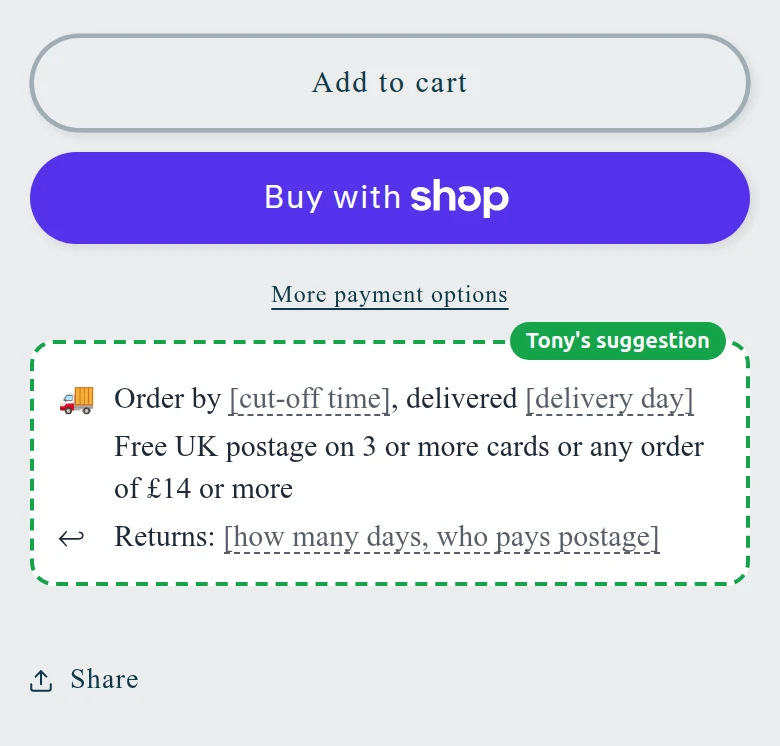
Tony drew his suggestion into your own page, as a phone shows it. Words in [brackets] are yours to fill in.
Step by step in Shopify
You + a developer for one part- In your admin, click:Settings › Policies
Open Settings, then Policies, and read your published refund policy; note its return window, conditions and return-postage terms. Check your shipping information and fulfilment routine for a realistic UK order-to-arrival timeframe, including preparation time. Fill the copy below with verified terms only, without replacing your existing policies.
Store policiesShopify Help Center · help.shopify.com - In your admin, click:Products
Under Products, open Ponies at Taw Marsh Horseshoe, Dartmoor and find Description. Keep the design story, but replace its prose specification sentences with the Card details copy below, formatted using the editor’s bullet-list control; save. This list belongs in the pony card’s description, not every product’s description.
Product descriptionsShopify Help Center · help.shopify.com - In your admin, click:Online Store
Note the pony card’s current Theme template, then open Online Store and click Edit theme on your live theme. In the Home page dropdown, choose Products, then Create template; name it pony-buying-info and base it on that existing template. If template creation is unavailable, use the developer brief.
TemplatesShopify Help Center · help.shopify.com - In your admin, click:Online Store
In the new template’s product-information area, check whether Add block offers a text block. If available, paste the completed Delivery and returns copy, drag the block directly below the price, and save; otherwise, give your developer the brief below. Keep these answers visible, not inside a closed panel.
Sections and blocksShopify Help Center · help.shopify.com - In your admin, click:Products
Return to Products and open Ponies at Taw Marsh Horseshoe, Dartmoor. In Theme template, select pony-buying-info and save, so the new buying-information block appears only on this card for now. Leave other products on their existing templates.
Apply a templateShopify Help Center · help.shopify.com - In your admin, click:Products
On the product page in your admin, click Preview. Check the storefront on desktop and your phone: delivery and return terms should sit below £3.50, with the structured card details in the description. Remove every placeholder before you call this finished.
Preview a productShopify Help Center · help.shopify.com
Ready to paste: Delivery and returns: text block directly below the pony card’s price
UK delivery: [verified total working-day range] working days from placing your order to arrival. Free UK postage on 3 or more cards or any order of £14 or more. Returns: [short summary of your published return window, conditions and who pays return postage].
Ready to paste: Card details: format each specification as a bullet in the pony card’s description
Card details Size: 127 x 178 mm (5 x 7 inches) Inside: Blank Envelope: Included Materials: Recycled paper and card Packaging: Plastic-free
How you’ll know it worked
On your phone, confirm the pony card shows completed delivery and return terms below the price and a readable details list; watch your online-store conversion rate over the next few weeks without treating a small change as proof. Next time, repeat the verified copy and structured details on your best sellers, checking each product’s terms before reusing the layout.
For your developer
Forward this to your developer. This part is for them:
Only if the native template or text-block controls are unavailable: create a separate product template based on the pony card’s current layout and assign it only to Ponies at Taw Marsh Horseshoe, Dartmoor. Display the owner-approved Delivery and returns copy directly below the price, outside collapsed panels, without changing purchase controls. Confirm the copy is readable on mobile and desktop and that another product remains unchanged.